CaptureGem
Automatic stream recording
Record Streams in High-Quality with CaptureGem
Capture every moment from Chaturbate, Stripchat, Twitch, MyFreeCams, and 130+ other platforms. Automated scheduling, built-in review tools, and support for both VR and non-VR streams.
Windows, macOS & Linux · No signup required
See It In Action
Record from Chaturbate, Stripchat, MyFreeCams, and more. All files are saved as .mp4 for easy playback on any device.
Key Features
Record Unlimited Models
Multi-threaded engine records as many streams as you want simultaneously.
Auto-Record on Go-Live
Automatically start recordings when models come online, and resume after disconnects.
VR + Standard Streams
Records both VR and non-VR streams in top quality resolution into .mp4 format.
Review & Manage
Browse recordings with auto-generated image grids, favorites, tags, and deletion protection.
Live Monitor
Real-time thumbnails of all active recordings without consuming extra bandwidth.
Built-in Editor
Edit and combine recordings to keep your favorite segments.
Cross-Site Groups
Group models from multiple sites and continue from another site if a model goes offline or private.
Proxy Mode
Record private shows, unsupported sites, and saved recordings through Chrome-viewable streams.
Includes complimentary access to CamTrove Premium, an archive of thousands of recordings.
Windows, macOS, and Linux supported – Get the latest version.
Screenshots
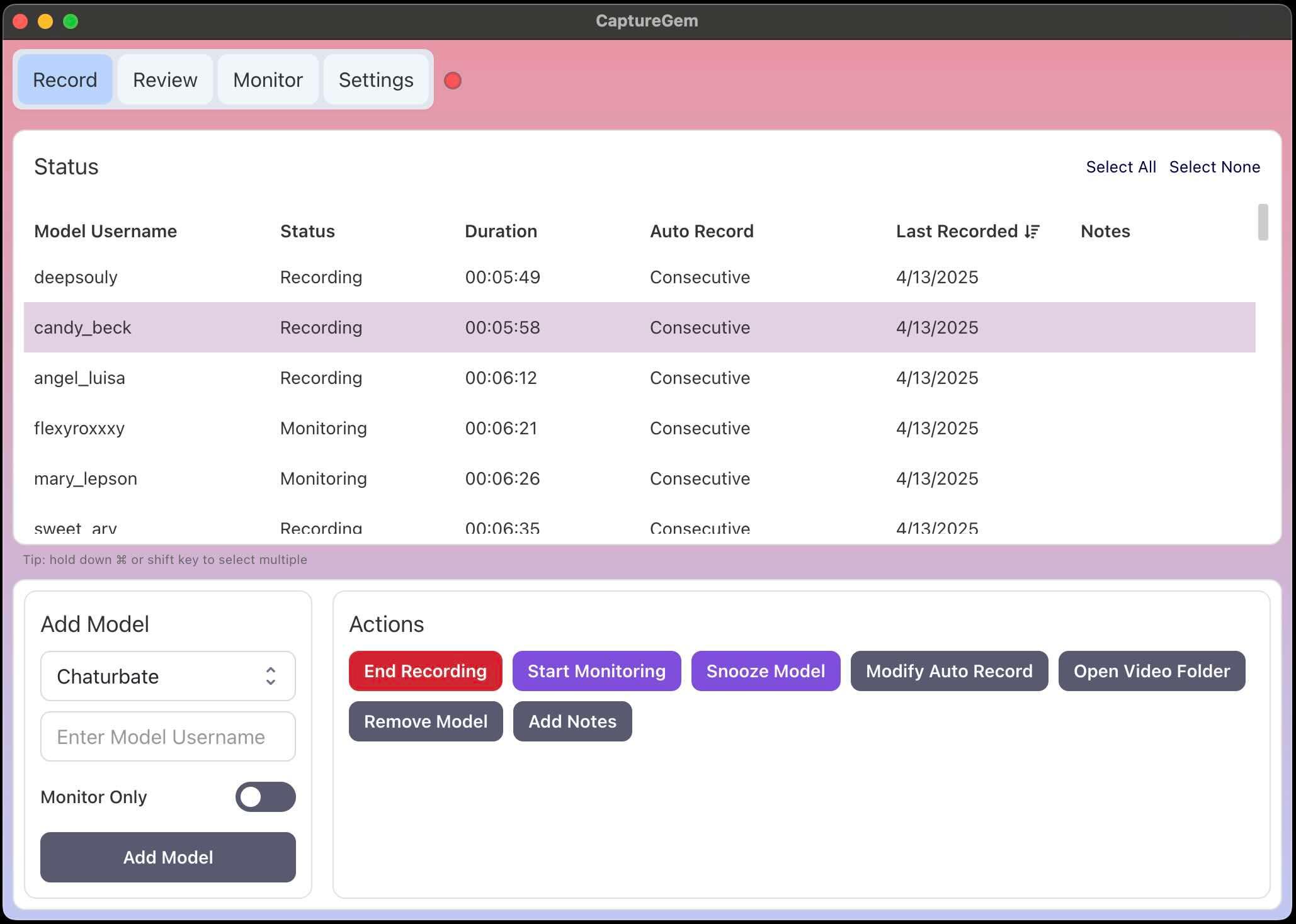
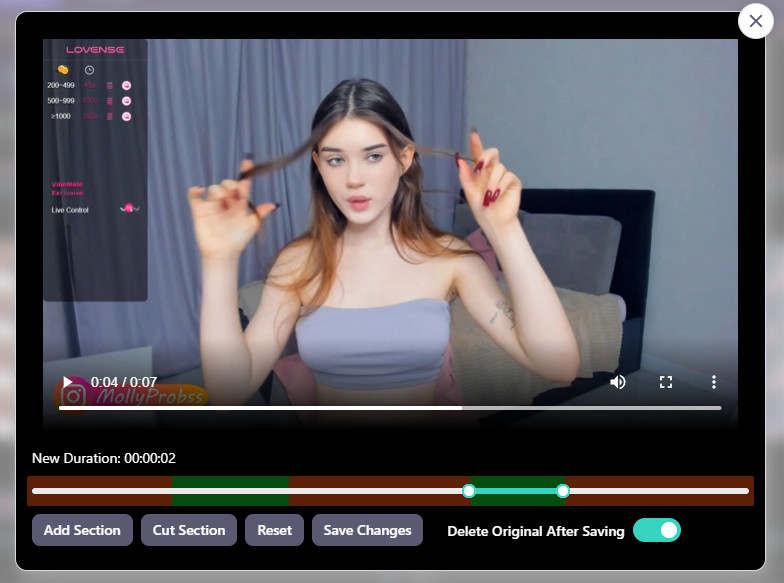
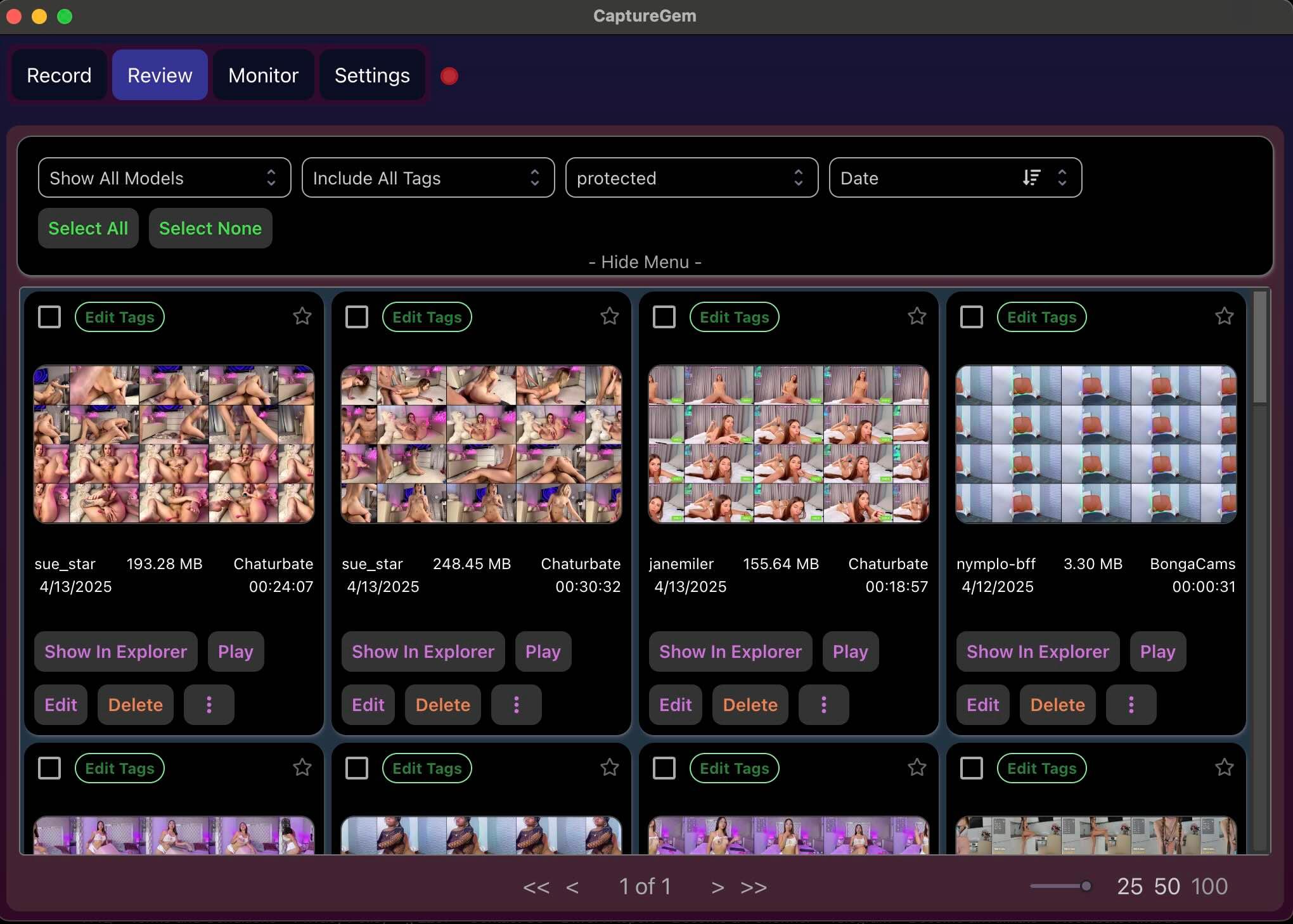
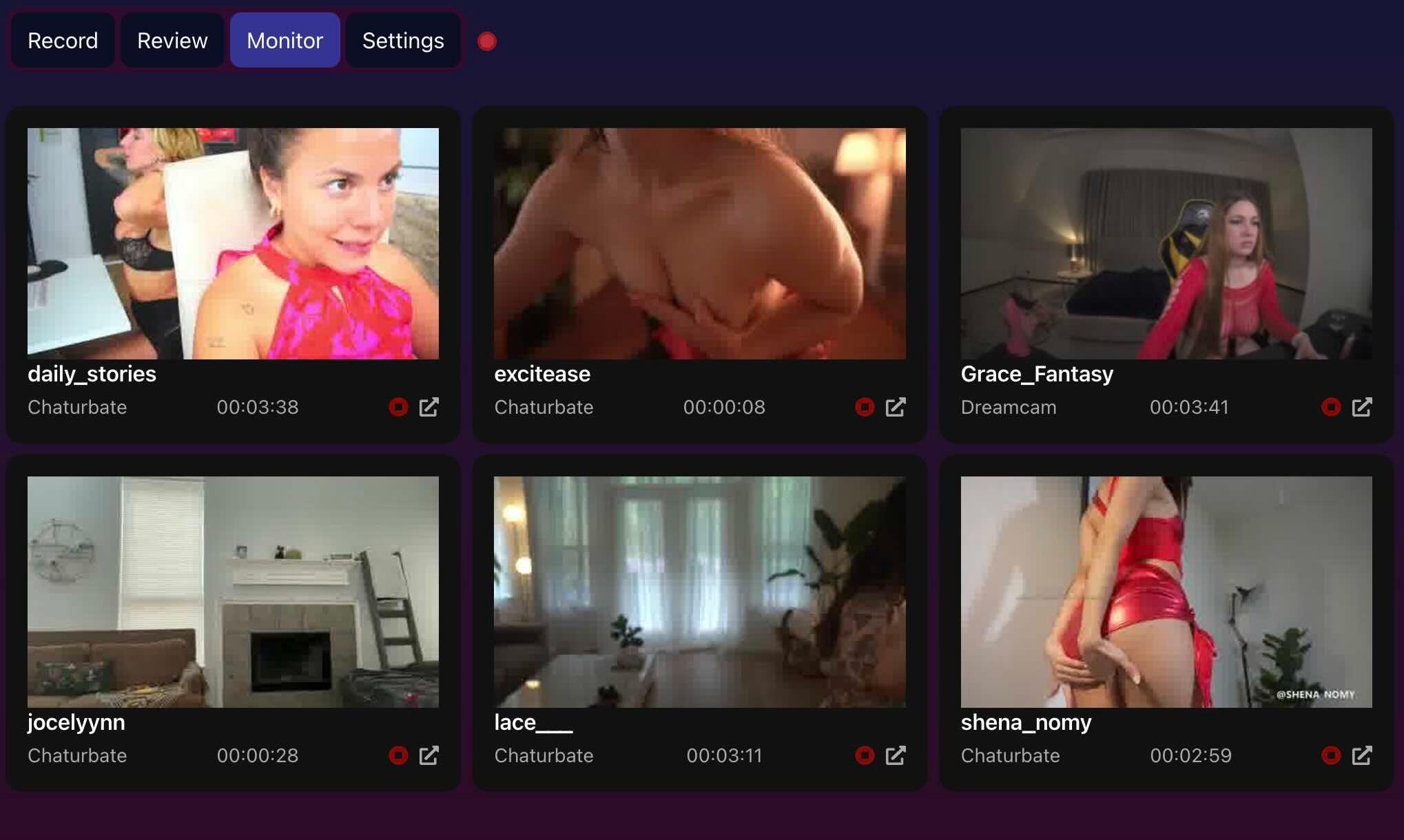
Supported Platforms
Record from 24 built-in site options, including VR, plus additional streaming platforms through Streamlink. Choose a site below for its recording guide.
Built-in Sites
- Chaturbate
- Stripchat
- XHamsterLive
- StripchatVR
- BongaCams
- CamSoda
- CameraPrive
- MyFreeCams
- Flirt4Free
- Streamate
- Jerkmate
- LiveJasmin
- ManyVids
- Cams.com
- Cam4
- XCams
- XLoveCam
- Dreamcam
- SexLikeReal
- AmateurTV
- Sexchat.hu
- TangoMe
- Bigo TV
- Superlive
Other Supported Sites
Paste a supported stream URL, confirm the site, and select Add Stream. See all supported sites.
VR recordings are best viewed with HereSphere (Steam) — set to Fisheye, SBS, FOV 120.
Download CaptureGem
Version 2.14.14 — 23,743 total downloads
Free to download and use. No signup required.
Upgrade to premium for unlimited recordings and advanced features.

Frequently Asked Questions
Getting started
What is CaptureGem?
CaptureGem is a desktop app for Windows, macOS and Linux that records live streams from cam sites such as Chaturbate, Stripchat and MyFreeCams, and from streaming platforms such as Twitch and Kick. It saves recordings as .mp4 files on your computer, shows live thumbnails of active recordings, and lets you review, tag and edit your recordings in the app. With Premium, it can also start recording automatically whenever a model comes online.
Is CaptureGem free?
Yes. CaptureGem is free to download and use, and you don't need an account. The free version can hold up to 10 models and saves up to 5 minutes per recording. Premium removes these limits and adds automatic recording; see What does Premium add?
Which operating systems does CaptureGem support?
- Windows
- macOS, with separate downloads for Apple Silicon and Intel Macs
- Linux (x86_64), as an AppImage built on Ubuntu 22.04; older distributions may not work
Get the current version from the download section. Earlier builds are listed on Past Versions.
Which sites can CaptureGem record from?
CaptureGem has 24 built-in site options, including Chaturbate, Stripchat, MyFreeCams, BongaCams, CamSoda, Cam4 and VR streams. It can also record many other streaming platforms, such as Twitch, Kick, YouTube and TikTok, through Streamlink. See the full list of supported sites, or pick a site in Supported Platforms for its recording guide.
How do I install CaptureGem?
Download the version for your computer from the download section, then:
- Windows: right-click the .zip file, choose Extract All, and run CaptureGem.exe from the extracted folder, not from inside the zip. If Windows warns you, click Run anyway. When Windows Firewall asks, allow CaptureGem.exe and recorderd.exe.
- macOS: open the .dmg file, drag CaptureGem into your Applications folder, and open it from there.
- Linux: extract the archive, make the AppImage executable with
chmod +x, and start it with the included launcher.sh.
To record, open the Record tab, paste the model's room link or username into Enter URL or Username, and click Add Stream. Each site's recording guide shows which links and names it accepts.
How do I update CaptureGem?
When a new version is out, CaptureGem shows a New Version Available: Update App button at the top of the app. On Windows, the button downloads and installs the update and restarts CaptureGem, which also stops any active recordings. On macOS and Linux, download the new version from the download section and install it the same way as the first time. You can hide the button with Show Updates When Available in Settings.
Is CaptureGem safe to use?
Yes. We publish the SHA-256 checksums of every release (see Verify SHA-256 Checksums under the download buttons), so you can check that your download hasn't been changed. The macOS builds are signed and notarized by Apple, which includes a malware scan. CaptureGem doesn't bundle adware or other software and doesn't make changes to your system. If you have questions about safety, ask in our Discord.
Recording
Where are my recordings saved?
Finished recordings are saved as .mp4 files in the videos/out folder inside CaptureGem's data folder:
- Windows:
%LOCALAPPDATA%\capturegem - macOS:
~/Library/Application Support/capturegem - Linux:
~/CaptureGem_Data
To save them somewhere else, such as a larger drive, use Set Video Save Location in Settings. The Review tab can open the folder of a recording for you. Older installations can use a different folder; the File Locations Guide explains every folder CaptureGem uses.
How much disk space do recordings need?
It depends on the stream's resolution and how long you record; high-resolution and VR streams use the most. CaptureGem helps you keep space free:
- Minimum Free Disk Space for Recording (%) (default 2%) pauses recording when the drive gets too full and restarts the paused recordings once space is free again.
- Max Resolution Per Site caps the resolution of each site to save bandwidth and disk space.
- Temp File Retention (Hours) keeps a recording's source files for 3 hours by default after conversion, which roughly doubles the space a video uses until they expire. Set it to 0 to delete them right away.
- Audit disk space in Settings shows what is using space in your CaptureGem folders, without deleting anything.
See the settings guide for details.
Can I record several models at the same time?
Yes. The free version can hold up to 10 models and saves up to 5 minutes per recording. With Premium, you can record as many models at once as your internet connection and computer can handle. To limit how many automatic recordings run at once, set Max Concurrent Auto Recordings in Settings.
Can CaptureGem record automatically when a model comes online?
Yes, with Premium. Choose an auto-record mode for each model with Modify Auto Record on the Record tab. Record Always records the model whenever they are online and restarts after a disconnect, and Record With Expiry does the same for a limited time (120 minutes by default). To give every new model Record Always, turn on Auto Record All Newly Added Models in Settings.
Can I record while my computer is turned off?
No. CaptureGem records on your own computer, so the computer must be on and CaptureGem must be running. Closing CaptureGem's window only hides it, and it keeps recording in the background; Exit CaptureGem in Settings quits it completely.
To record around the clock, you can run CaptureGem on a computer that stays on. Advanced users can run the recorder without the desktop app on a Linux machine; see Running CaptureGem Recorderd Standalone on Linux.
Can CaptureGem record private shows?
Yes, with Premium, using proxy mode. You start Google Chrome through CaptureGem, watch the show in that browser, and click Record in CaptureGem's Proxy tab. Proxy mode records private shows you can watch in your own browser, such as Chaturbate and Stripchat private shows, and sites CaptureGem can't record on its own. Follow the proxy guide for Windows, macOS or Linux.
What do the different settings do?
Hover over a setting to see its tooltip. The Overview of the CaptureGem Settings explains every setting and its default value. Changes take effect after you select Save Changes.
Troubleshooting
What should I do if a recording fails?
- Update to the latest version of CaptureGem; many recording problems are fixed in new releases.
- Click the status dot in the top-right corner of CaptureGem to open Queue Status. The Transcoding Queue tab lists recordings that failed to convert, and Unfinished recordings lists recordings that didn't finish.
- Read the recording guide for the site; some sites need extra steps.
- Premium users can send the recording's logs and data to support from Queue Status or the Review tab; see How to Send a Failed Recording to CaptureGem Support. Otherwise, ask in our Discord.
Don't delete a failed recording's temporary files until support has looked at it.
I'm having trouble recording from Chaturbate. What could be the reason?
First, make sure you have the latest version of CaptureGem. If a model shows Rate Limited, Chaturbate has asked CaptureGem to slow down. CaptureGem pauses and retries automatically, so recording resumes on its own and there is nothing to change.
If Chaturbate blocks your region or asks for age verification, add Chaturbate Custom Headers so CaptureGem uses your signed-in Chaturbate session. Saved sessions expire, so if CaptureGem says your Custom Headers may have expired, copy a fresh request.
Chaturbate still blocks some VPN connections, so if recording only fails with your VPN on, try another server or turn it off. For more help, see How to Record from Chaturbate.
VR recordings sometimes disconnect early. How do I fix this?
VR streams need a lot of bandwidth, so first make sure your internet connection is fast enough. Some internet providers slow down or interrupt streams; a VPN can help. You can also raise Network Timeout (Seconds) (default 90), which ends a recording when no data arrives for that long, or lower Error Retry Wait Time (Seconds) (default 30) so recordings restart sooner. Very short waits can cause rate limiting. If it keeps happening, ask in our Discord.
How do I completely reset CaptureGem if I'm having issues?
Use Reset Data in Settings. It can permanently delete settings, temporary files, metadata and videos, so read How to Reset Your CaptureGem Installation first to back up what you want to keep.
What is the difference between CaptureGem.exe and recorderd.exe?
CaptureGem.exe is the app window you use. recorderd.exe is the background recorder: a multi-threaded process that records the models and keeps track of their state. The two communicate over a local web socket, which is why Windows Firewall asks for permission. If the app shows an IPC error, select Restart Recorder Process in Settings; active recordings stop when it restarts.
What programming languages were used to develop CaptureGem?
The app window was built with Electron in TypeScript and styled with MUI Joy. The background recorder is written in Go, which performs well for multi-threaded and asynchronous network and disk work.
VR recordings
What's the best way to watch VR recordings?
We have found that they look best in HereSphere, available on Steam. In HereSphere's advanced settings, set the videos to Fisheye and side-by-side (SBS), reduce the field of view (FOV) to 120 degrees, and set the aspect ratio to auto so the videos don't look stretched. Any VR video player that can open files on your computer should work.
Why does the VR video appear too thin or stretched?
The player's aspect ratio is wrong. In HereSphere, set the aspect ratio to auto. In other VR players, adjust the aspect ratio setting the same way.
Account, privacy and support
How does CaptureGem handle my privacy?
CaptureGem records on your own computer, and your recordings and model list stay there. A recording only leaves your computer if you send it to support yourself, and CaptureGem removes passwords, cookies and similar private details from the logs and settings it sends.
Enable Anonymous Error Reporting (on by default) sends anonymous reports of serious errors to help us fix bugs; you can turn it off in Settings. A CaptureGem account stores your email address. Card payments are handled by our checkout partner, and we don't keep your card details. See our Privacy Policy.
How do I delete my account?
Email [email protected] from the email address of your account and ask for it to be deleted. We send you a confirmation link; deletion starts no earlier than seven days after the request, and any active subscription is cancelled first. Recordings on your computer are not affected.
Where can I get help?
- Browse the CaptureGem guides for setup and recording instructions for each site.
- Ask the community and the developer in our Discord.
- Email [email protected] for account and billing questions.
- Premium users can send a failed recording to support straight from the app; see How to Send a Failed Recording to CaptureGem Support.
What Our Users Are Saying
Something I've been looking for for quite some time. It does exactly what it says it does. It allows you to record both VR and non-VR cam streams in full quality. You can record dozens of streams at once and there's a handy review tab built into the program that has screenca...

TheLonelyOne
Amazing app, the fact you're able to record VR Cams is just mind-blowing. Used to be a little buggy but now it's stable. It is getting better day by day with the updates. More updates brings new features, less bugs so I'm always waiting for those announcements. Overall, I wo...

James C
We hope you enjoy recording with CaptureGem!
Feel free to leave feedback in our Discord.